The article Google Maps shows fuel prices along your route – here’s how it works first appeared in the online magazine BASIC thinking. With our newsletter UPDATE you can start the day well informed every morning.
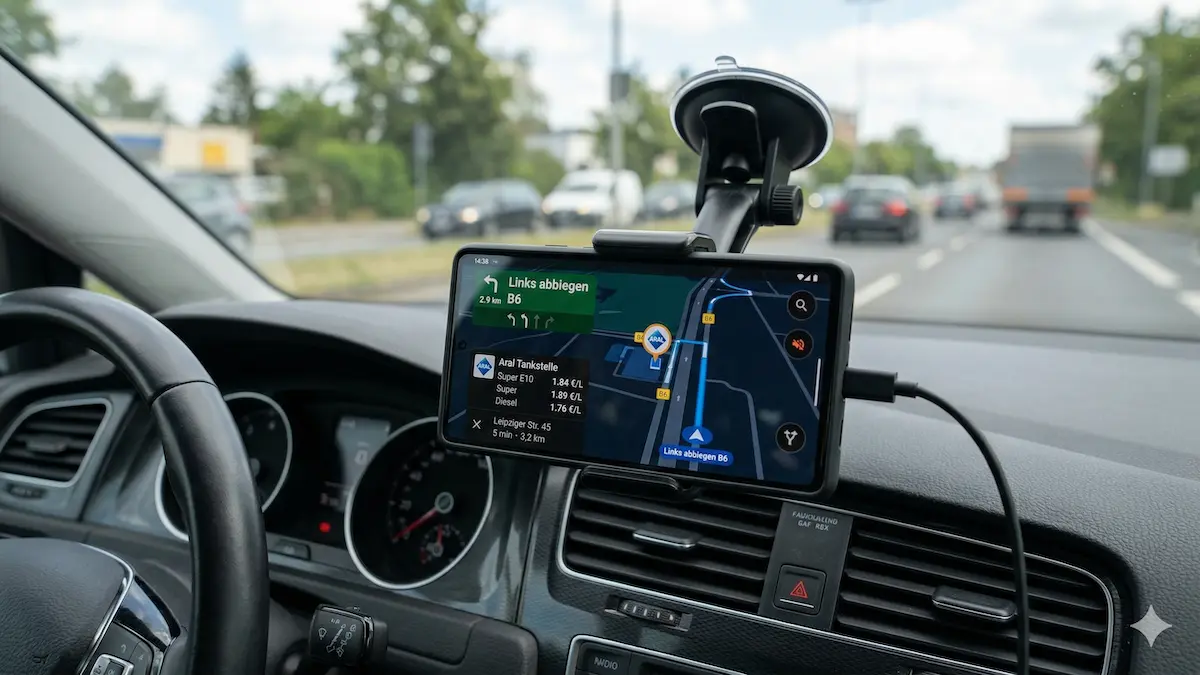
Anyone who fills up regularly knows the problem: at one gas station a liter of Super costs 2.07 euros and two kilometers away it only costs 2.02 euros. Google Maps now shows fuel prices directly along the planned route. We’ll tell you how you can use the function and what alternatives there are.
The mobile navigation app Google Maps shows current fuel prices from various gas stations directly in the application. Users can compare different providers and select the cheapest options for their fuel stop. Above all For people with high mileage, such a digital price comparison is worthwhile in everyday life. DYou can easily start your search by entering the term “gas station” into the search field.
Even a quick search provides locations in the surrounding area along with their current prices. This way you can find an inexpensive way to travel. The feature also makes cost differences clearly visible before you reach the pump.
How to find cheap gas stations on your route
If you have an active route, select the stopover option. Google Maps then lists all gas stations directly along the calculated route. In this overview, the tool initially only shows you the price for one liter of premium gasoline.
If you tap on the desired station, the complete overview appears with the costs for Super E10, Diesel or Super+ 98. The data shows costs of approximately 2.07 euros for Super 95 and 2.06 euros for Super E10 (as of March 30, 2026)
However, when using it, you have to pay attention to two important restrictions. First of all, prices can change until they arrive at the pump. In the time between searching and reaching your destination, gas stations often adjust their costs – although with the new fuel price rules in Germany, this should only be once a day in the future.
Also carefully consider whether a detour is economically worthwhile. Because an additional route that is too long causes additional fuel consumption. This additional consumption may completely cancel out the price advantage.
Gas price comparison: 3 alternatives to Google Maps
The function is available in the latest Google Maps app. Drivers who want to compare prices on their PC can instead use the ADAC’s gasoline price search in the web browser. In addition to Google Maps, there are specialized apps such as “More fuel” (for Android) or “Fill up smartly” (for Android). The latter also finds electric charging stations in the area.
The application “ADAC Drive“, on the other hand, combines route planning with an extensive price comparison. Users of an ADAC account can benefit from personalized use by creating favorites. This service significantly speeds up the comparison process on frequently traveled routes. This means that users can keep an eye on their favorite gas stations quickly and permanently.
Conclusion: Google Maps is the most practical solution for a quick price check on the go because most drivers use the app for navigation anyway. However, if you regularly drive the same routes and want to save favorites, you are better off with ADAC Drive. Smart refueling is particularly worthwhile if you also want to keep an eye on charging stations for electric cars.
Also interesting:
- E20: What you need to know about the new organic fuel
- Buying a used electric car: This is what you should pay attention to
- Why electric cars are cheaper in China than in Germany
- Battery technologies in comparison: lithium, sodium, solid state and redox flow
The post Google Maps shows fuel prices along your route – here’s how it works appeared first on BASIC thinking. Follow us too Google News and Flipboard or subscribe to our newsletter UPDATE.
As a Tech Industry expert, I find the addition of fuel prices along your route on Google Maps to be a highly useful and practical feature for users. Not only does it provide real-time information on where to find the cheapest gas along your journey, but it also helps users plan and budget for their trips more effectively.
By integrating this feature into Google Maps, users can make more informed decisions about where to stop for fuel, ultimately saving time and money on their travels. This feature also promotes competition among gas stations, as users are more likely to choose stations with lower prices displayed on the map.
Overall, I believe that the inclusion of fuel prices on Google Maps is a valuable addition that enhances the user experience and demonstrates the platform’s commitment to providing comprehensive and helpful navigation services.
Credits