The article Image Playground from Apple: Create AI images directly on the iPhone first appeared in the online magazine BASIC thinking. With our newsletter UPDATE you can start the day well informed every morning.
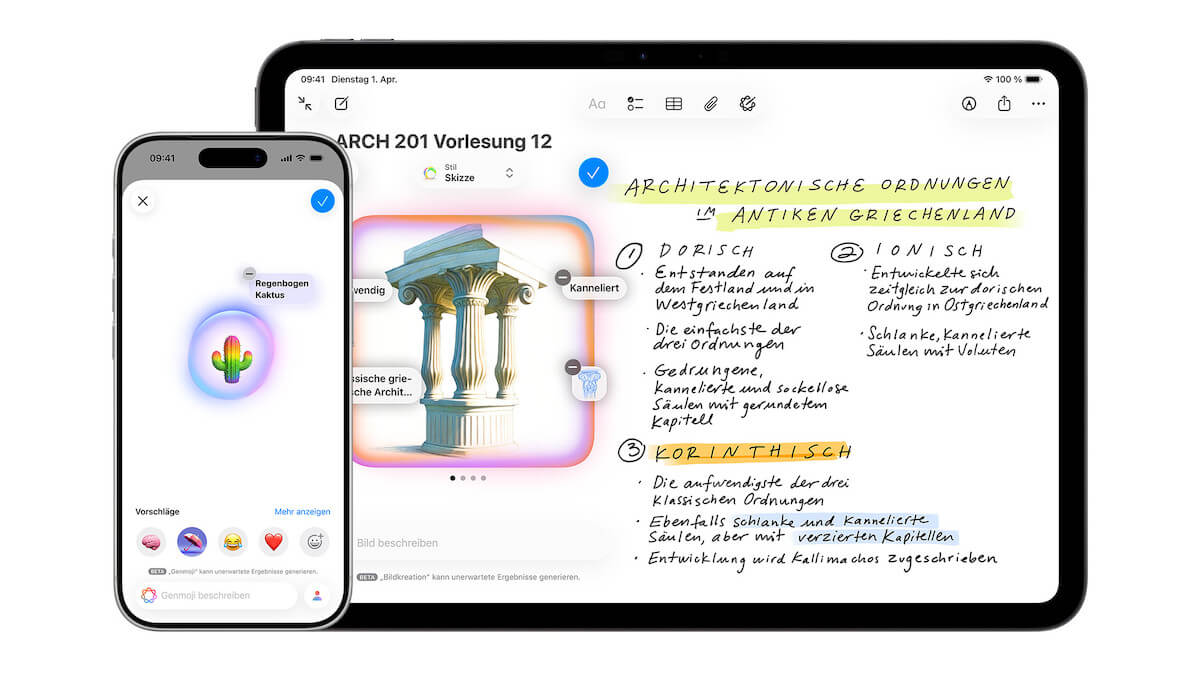
Apple has brought its own app for AI image generation directly to the iPhone, Image Playground. By entering text or using prefabricated concepts, images can be created, edited and integrated into other Apple apps in seconds. The function has also been available in Germany since spring 2025. We’ll show you what options Image Playground offers and how to use the app step by step.
What is Image Playground?
With Apple Intelligence Apple has integrated its own AI directly into the iPhone, iPad and Mac. The system was presented for the first time in 2024 at the WWDC developer conference. In autumn 2024, Apple began to gradually introduce the functions and since spring 2025, Apple Intelligence has also been available in Germany and the EU.
The AI ecosystem from Apple includes, among other things, intelligent writing tools, a revision of the voice assistant Siri, automatic summaries and image functions. One of these applications is Image Playground.
The app allows users to create AI-generated images directly on the iPhone by entering text and then integrate them into other Apple applications. Here you can find out what you need to know about Apple’s AI app and how you can use it.
This is how you can use Apple’s AI app
To use Image Playground, some technical requirements must be met. The function is part of Apple Intelligence and therefore only runs on compatible devices.
This includes all iPhone models from the iPhone 15 Pro and iPhone 15 Pro Max. The devices from the iPhone 16 and iPhone 17 series as well as the iPhone Air are also compatible.
In addition, at least iOS 18.4 is required on the iPhone. Apple Intelligence and thus also Image Playground have only been officially available in Germany and the EU since this update.
If these requirements are met, you can use Apple Intelligence in the Image Playground app. According to Apple This allows you to combine concepts, text descriptions and people from your photo library “to create images within seconds”.
It is also possible to create images in Messages, Freeform, Keynote, Pages, Apple Invitations and supported third-party apps with the help of Image Playground.
Create or edit AI images with Image Playground on iPhone
With Image Playground you can either create a new image or edit existing images. Various concepts such as themes, facial expressions, costumes, accessories or locations are available to you.
If that’s not enough for you, the Describe Image function is available. To do this, you need to type in your descriptions and then click Send. Another option is the Select Person function. Here you can select a person from your photo library. However, that person must be named in the Photos app.
Apple offers different styles for finalizing your image. A distinction is made between the styles of Apple Intelligence and ChatGPT. Apple Intelligence offers styles such as animation, illustration or sketch. But you can also create a Genmoji, i.e. a personalized AI emoji.
If you choose ChatGPT, you can either select a preset style or choose the “Any Style” function. This allows you to describe the style you want by entering text.
In the preview function, Image Playground then offers you different versions, which you can select, delete or further refine. If you are happy with your image, tap the save button in the top right to save it to your gallery.
If you have edited an image that has already been saved, you can apply the changes by clicking on “Done”. You can still decide here whether you want to update the existing image or save it as a new image. A new hairstyle, extra glasses or a different facial hair – you can add all of this to an image from your photo library at Image Playground. To do this, use the “Adjust Appearance” function in your app.
It is also possible to use text input. For example, if you put glasses on a person but they are the wrong color, you can have them adjusted using a text instruction.
Use Image Playground in News or Freeform
By interlinking with other apps from the Apple ecosystem, it is possible to use Image Playground directly in Messages or Freeform, for example. You have easy access to this in your messages using the small plus next to your input field.
Simply select Image Playground here. You can now choose whether you want to use an image you have already created from your gallery. Alternatively, you can create a new image and then send it.
In Freeform you can also use up to six elements such as images or drawings from your board. All you have to do is tap the respective content and add it to Playground.
Also interesting:
- DFKI develops AI detector: expose fake images via Instagram
- Protection for your chats: This is how you can activate Face ID for WhatsApp
- Assign an action button on the iPhone: 12 functions are available to choose from
- Waste heat from data centers: Finland shows how the energy transition works
The post Image Playground from Apple: Create AI images directly on the iPhone appeared first on BASIC thinking. Follow us too Google News and Flipboard or subscribe to our newsletter UPDATE.
As a tech industry expert, I am impressed by Apple’s Image Playground, which allows users to create AI-generated images directly on their iPhones. This innovative feature showcases the power of AI and machine learning in the realm of creative expression.
The ability to generate unique and visually stunning images with just a few taps on a smartphone is not only convenient but also opens up a whole new world of possibilities for artists, designers, and anyone interested in exploring the intersection of technology and creativity.
I believe that Image Playground has the potential to democratize the creation of AI art and make it more accessible to a wider audience. It also highlights Apple’s commitment to pushing the boundaries of what is possible with mobile technology and setting new standards for innovation in the industry.
Overall, I see Image Playground as a game-changer in the way we think about creating art and harnessing the power of AI, and I look forward to seeing how it continues to evolve and inspire users in the future.
Credits